Friday, January 30, 2026

How to drop a class by the Feb 24 deadline

Friday, 1/30/2025 is the deadline to add a class, but you can still drop up to the February 24 deadline (after the drop deadline, you can withdraw with a W on or before March 26)


Follow the easy online steps below to drop a class on or before the deadline. 

1. Contact your adviser to discuss and obtain their approval

Best practice is to have an advising conversation where you discuss options and any possible implications of this drop on your full-time status or your graduation progress, but depending on how much you and your adviser have already discussed things, they may agree to review and approve your form without such a meeting


2. Submit the online Drop Request Form

You will only be able to drop online if your adviser grants permission. Be sure that you are not attempting to drop below 12 credits unless approved via CARDS or as a final-semester senior  -- the system will not allow drop below 12 credits without additional approval, and there are separate processes for tho approved situations.


3. Once your adviser grants permission, you will receive an email informing you that you have permission to drop the class(es) discussed.

While this adviser permission is for the specific class you request, functionally it reopens your ability to drop in general, so be sure to drop the right class and nothing else.


4. **do NOT forget this step!!!** You will have two days to drop the class on Vergil.*

If you don't drop within the 2-day window, you will need to request permission again. 

*Note that you must drop on or before the drop deadline if you want the class removed from your transcript.


Register for the Spring 2026 Francine LeFrak Financial Well-Being Undergraduate Certificate Program!

The Francine LeFrak Financial Well-Being Undergraduate Certificate Program is an 8-week student-led financial education program with a curriculum specialized for college students by college students to jumpstart your journey towards financial freedom. Learn about budgeting, saving, investing, & so much more from Barnard peers! Register here.

Build Healthier Relationships

What if love were something we were taught — with intention, thought, and care? The brand new 7-week relationship management certificate program (express your interest here), offered through the Francine A. LeFrak Foundation Center for Well-Being, invites students to explore what it means to build healthy, meaningful relationships in today’s world. Through guided discussions, interactive activities, and reflective exercises, participants will develop foundational skills around communication, boundaries, consent, navigating endings, grief, and digital connections. This certificate program is facilitated by the Clery Interns in collaboration with the Being Barnard team and is designed to support students in building confidence in their interpersonal relationships, both in person and online. Questions Email lefrakcenter@barnard.edu


Thursday, January 29, 2026

Senior FAQ: I submitted a form online -- how do I know if it was received, reviewed, or approved?

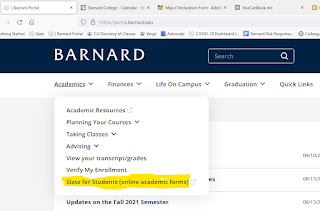
Did you submit one of the online forms that are available via the Slate for Students website? 

Wondering how to track its progress, i.e. to see if/when it was received, approved, processed, etc.?

Here's how to check.

1. Log into Slate directly or find it on the Barnard Portal under the Academics tab


 2. In the Home tab of Slate, scroll down to the bottom of the page, to Forms Submitted. There you'll see any forms you have submitted and can track them along their route from submitted to approved and processed. The legend below explains any symbols

3. That's it!

Expecting to graduate this spring? Missed the Jan 23 deadline to submit the Graduation Application? Don't panic! But DO address this ASAP


All students who expect to finish requirements this semester (May 2026 grads) should have filled out the Graduation Application by the Jan 23, 2026 deadline.


Oh no! I forgot to take care of this; am I too late??? What now???? 

It's not too late, but at this point, you must petition ASAP for late approval to be added to the list of prospective May 2026 grads

What to include in this petition:
 
1. Answer YES when asked if you have met with your class dean (assuming you have been in touch with her about this) 
 
2. select "other" as your petition type.  
 
3. In the first box -- "Describe your petition/special case" -- explain what you are petitioning for: to apply to graduate after the deadline, and also include all the details that would have been in the GradApp:
- Your full name as you would like it to appear on your diploma
- Your confirmed major(s)
- Your confirmed minor(s)
- Mailing address where you would like the diploma to be sent (likely in July)

4. The second box -- "Explain the justification for your petition" -- is where you make your case, why you're applying late and why you hope they will approve your petition.

    Don't delay -- take care of this today!
    Both Barnard and Columbia will use the list of students who have applied to graduate: to generate lists for commencement participation, cap-and-gown purchase, ticket eligibility, dorm move-out dates, diplomas, eligibility for certain academic honors and prizes, and other essential matters for graduating seniors.  Failure to apply to graduate may jeopardize your ability to participate in Commencement this May and receive your degree on time.   


    Not graduating this May but have a May 2026 graduation date in Slate, Student Planning, or your degree audit?

    Submit this form to update your degree date: https://slate.barnard.edu/register/chg_ant_deg_date


    Questions? 
    Contact registrar@barnard.edu.


    Wednesday, January 28, 2026

    Hot Chocolate Table on February 5th for Summer Session!

    We wanted to share a message from Bo Hubbard, Associate Director of Summer Session & Pre-College Programs, about Summer Session here at Barnard. They are currently underway with getting courses set and would love to have students and faculty exposed to these course opportunities.

    Registration is set to open on Tuesday, March 3rd and are hosting a hot chocolate table on Thursday, February 5th from 11AM-1PM in Barnard Hall to connect with students. You may find more information about the event here! You can also look through the Summer at Barnard page for further information!

    PE Classes Closing today!

    Last chance for PE registration! All PE classes will be closing for registration at 4PM today Wednesday, January 28th.  Any additions or changes after that must be made thorough direct request to Department Chair Lisa Northrop (lnorthro@barnard.edu). 

    Monday, January 26, 2026

    New Neuroscience Lab for non-majors!

    The Neuroscience Department is launching a new neuroscience lab class specifically for non-neuroscience majors--NSBV BC1002 Introductory Laboratory in Neuroscience and Behavior. Three sections will be offered this coming Spring 2026 semester right on the Barnard campus! 

    If you need to fulfill your lab science requirement, you may register for this lab class concurrently with NSBV BC1001 Intro to Neuroscience lecture. Alternatively, students may also register for the lab class if you previously completed NSBV BC1001 lecture.

    Friday, January 23, 2026

    Senior Year FACT or FICTION: possible to take fewer than 12 credits in your last semester????


    FACT OR FICTION:
    Is it true that you can take fewer that 12 credits in your last semester?


    YES; this is FACT, BUT ONLY IN VERY SPECIFIC CIRCUMSTANCES and by following proper procedure

    As stated in the Barnard College Catalogue:

    "Graduating seniors who need fewer than twelve credits to complete their degree – and who have already satisfied the College’s academic residency requirement and completed at least four full-time semesters in academic residence – may be approved to take a minimum of nine credit hours. Because Barnard students are charged a flat rate of tuition per semester, reducing one’s course load to nine credits will not change the tuition owed in the last semester. International students must consult with International Student Services in advance to determine eligibility.  Students who meet these criteria and are approved to be enrolled in nine credits are still eligible to live in Barnard’s residence halls. 

    If any student who is not an eligible senior needs to register for fewer than twelve credits for disability-related reasons, they should reach out to CARDS to discuss the reduced course load process at cards@barnard.edu."

    The form to request this will be available once the semester begins, so register for at least 12 credits now, and submit this form on or before the drop deadline next semester to request approval **Note that this request can only be made at the start of your final semester, for that semester**: https://slate.barnard.edu/register/final_semester_request

    Pro Tip: Double-check that the transcript you're uploading shows the actual number of credits you are currently registered for! (The transcript may take a day to reflect changes made in Vergil.)


    Heard a rumor and want to know if it's true?  Submit requests for this series to SeniorClassDean@barnard.edu

    Thursday, January 22, 2026

    **DEADLINE ALERT** Graduating? You must apply to graduate! -- DEADLINE = THIS FRIDAY, Jan 23 for May grads


    If you are planning to complete your degree requirements this semester, it’s time for you to apply to graduate.
     
    NOTE: While we call this an application, it is just a brief form to get you on all the right lists to be considered for graduation and get your cap and gown.  As long as you know your name, major, expected grad date, and mailing address, you can submit this form today!
     
    Deadline for May grads: Jan 23

    To have your degree awarded, you must apply to graduate (even if you do not plan to attend commencement ceremonies).  

    You can log in directly to student planning and access the Graduation Application from the main menu.

    OR

    portal.barnard.edu --> Graduation tab

    If you expect to finish requirements this spring, apply for Spring 2026 graduation.

    After submitting the form successfully, you will see an on-screen confirmation page -- there is no confirmation email. Take a screenshot for your records.

    If you are not planning to graduate this year, please complete this form so that we can update your record.


    FAQ: I think I submitted the GradApp. How can I tell if it went through?!?! 

    A: Log back into Student Planning and return to the Graduation Application page. If you have successfully submitted the GradApp, you will see this confirmed here!


    PE Updates!

    Still need to fulfill PE?  The following classes currently have space available:  

    Cardio Circuits T/TH 9am - 9:50am

    Beginning Yoga  - M/W 11am - 11:50am

    Cardio Circuits -  T/TH 12pm - 12:50pm

    Body Sculpting -  T/TH 5:10pm - 6:00pm

    Tai Chi  - M/W 2:10pm - 3pm

    Sign up on Vergil and attend the next class to retain your spot. Contact Department Chair Lisa Northrop at lnorthro@barnard.edu with any questions.

    Wednesday, January 21, 2026

    Use the Columbia University Projected Final Exam Schedule to plan ahead for your last finals week

    Source: Mortarboard 1943, Barnard Digital Collections

    Planning ahead for the end of your last semester?  The Columbia University Projected Final Exam Schedule is here to help. Days and times are accurate; the only difference between the "projected" exam schedule and the full schedule is the latter will also have locations.

    The detailed, class-by-class list for both Columbia and Barnard classes should become available online after midterms

    Note the following instructions regarding exam conflicts or exam hardship for Barnard students:

    Students will occasionally have two exams scheduled for the same time. If you have exam conflict (two exams at the same time) or exam hardship (defined as three exams within a 24-hour period or four exams within a 48-hour period), please fill out this form.

    Examinations are not rescheduled to accommodate travel plans.

    Tuesday, January 20, 2026

    ENGL BC3164 Shakespeare II

    The English Department wanted to share information about an English course available to students this semester: ENGL BC3164 (Shakespeare II.) Feel free to find more information about the course here as well as down below from the course description.

    ------

    Prerequisites: Enrollment limited to 60 students. Critical and historical introduction to selected comedies, histories, tragedies, and romances by Shakespeare. Please note that you do not need to take ENGL BC3163: Shakespeare I and ENGL BC3164: Shakespeare II in sequence; you may take them in any order.

    Everyone loves PE in January!

    There are many PE spots available in classes. Students who need to fulfill the PE requirement must join an open class and attend in order to retain their place. 

    Attendance credit will be counted on the first day. Check back during each of your registration times as spots will open up as students drop/add.  


    Please contact Department Chair Lisa Northrop (lnorthro@barnard.edu) with any questions.

    Senior FAQ: Can I take more than 19 credits? How/when can I get permission?

    Q: I heard it's possible for students to get permission from their adviser to take more than 19 credits. Is that true, and if so, how/when can I get permission?

    A: Yes, in rare cases, and only once the semester has begun. You may request adviser permission* for more than 19 credits only during the final registration period (Sept 2-12 for fall 2025). 

    --> You may request approval via this form: https://slate.barnard.edu/register/max_credit_request

    NOTE: Approval after the registration deadline is by petition only.

    *Please note that these requests will only be granted for urgent reasons, such as completion of a major, a minor, or for graduation requirements.


    Q: What if I get in off a waitlist that puts me over the limit?

    A: If you are removed from a waitlist and temporarily find yourself in more than 19 credits, you will need to drop the "extra" class or receive approval to exceed the limit 


    Warning: if you neither request permission nor drop below 19 credits, the registrar will drop you from the most recently added class.

    SENIOR FAQ: How to download a pdf of your degree audit

    Q: I'm filling out a form that asks for a PDF of my degree audit. How do I get one?


    A: By following these steps:

    1. Navigate to your degree audit in Student Planning:

    2. Click the "Print" icon in the upper right, just above the orange warning text:


    3. In the Print dialogue window, select "Destination: Adobe PDF" or "Print to PDF" depending on your operating system, being sure to select "color" if that is an option.


    4. Depending on how your computer is configured, this will open a new doc in Adobe or ask you where you want to save your new PDF.  If your browser asks how you would like to open the file, do NOT select "Open in browser."  Instead select "open in Adobe Acrobat" or whatever PDF-viewing software you have (e.g. Preview on a Mac)

    5. Give it a recognizable name and note where you are saving it, so you can find it and upload it to your Slate form.


    How to get your unofficial transcript

    Looking to access your college transcript, but don't know how to find it? Here are the steps to find your unofficial transcript:


    1) Go to Student Planning, a.k.a. "self service," and click on 'Unofficial Transcript'


    2) Once you click on 'Unofficial Transcript', you will see the following image. All you have to do it click on the 'Student COPY Transcript' document and your transcript will download! Then you can access it. Mission accomplished! :)


    If you have any questions feel free to reach out to registrar@barnard.edu.

    Need to contact a professor? Find their contact info using Columbia's person-search page!

    Need to contact a prof but don't know their email address? Here's a quick way to find contact info for almost anyone at Barnard or Columbia:

    Go to the main Columbia University Homepage at www.columbia.edu and click on the magnifying-glass icon at the top right


    A search box will appear. Type in the first and last name of whoever you're looking for


    If you just see websites and no contact or not enough contact info, click People under the search box and log in with your UNI as directed


    This will give you the full CU directory listing for your person 


    Senior Class Dean 2025-2026 -- Regular Walk-In Hours are resuming starting today, January 20th, 2026!


    NOTE: Regular walk-ins are resuming starting today, January 20th, 2026

    Got a quick question?

    Need to talk to a dean ASAP?

    If you have something complicated or want to be sure you can talk at length, please make an appointment via Dean Grabiner's online scheduler.

    Otherwise, during the semester, you may walk in virtually or in person beginning at any of the times below.  


    Tuesdays 3:30-4:30pm Eastern Time 

    • Enter waiting room via this Walk-In Hours Zoom Link or visit 105 Milbank,
    • We will see students on a first-come, first-served basis. 
    • If we run out of time and can't see you, we apologize for the inconvenience and encourage you to schedule an appointment, to try walk-ins on a different day, or for time-sensitive matters, to call the office at 212-854-2024 during business hours.

    Wednesdays: Degree Audit Drop-Ins 3:30-4:30pm Eastern Time

    • Enter waiting room via this Walk-In Hours Zoom Link or visit 105 Milbank
    • We will prioritize students seeking degree audit advice but will see other students if time permits 
    • If we run out of time and can't see you, we apologize for the inconvenience and encourage you to schedule an appointment, to try walk-ins on a different day, or for time-sensitive matters, to call the office at 212-854-2024 during business hours.

    Thursdays 3:30-4:30pm Eastern Time

    • Enter waiting room via this Thursday Afternoon Walk-In Hours Zoom Link or visit 105 Milbank.
    • We will see students on a first-come, first-served basis. 
    • If we run out of time and can't see you, we apologize for the inconvenience and encourage you to schedule an appointment, to try walk-ins on a different day, or for time-sensitive matters, to call the office at 212-854-2024 during business hours.

    NOTE: If you need to schedule an appointment with Dean Grabiner, please note that she typically works remotely on Fridays, so all meetings will be conducted virtually over Zoom or via phone call ONLY on that day

    Friday, January 16, 2026

    Important Information about the Spring Semester and Shopping Period

    Barnard College

    Dear Students,


    We hope your holiday break was enjoyable and that you are looking forward to the start of the spring semester. Please read the important information below, which includes details about the Spring Semester and Shopping Period.


    Registering for classes


    Registration will be open in Vergil from now through Friday, January 30. (Registration will be closed on weekends and on Monday, January 19). Registration start times can be viewed in Vergil.


    If you are searching for a class to add to your schedule, the Course Search in Vergil allows you to search by subject, by department, by GER, by classes with open seats, etc.  See screenshots here.


    •  First-year students: As a reminder, you should be registering for Barnard courses during your first year. You can easily limit your search to Barnard courses by selecting “Barnard College” in the School filter.


    You can continue to make changes to your class schedule in Vergil through 9:30 p.m. on Friday, January 30, which is the final registration deadline.


    By that date, be sure that you have:


    •  Registered for all classes you intend to take (including any zero-credit discussion section or lab classes). Note that students cannot remain registered for two classes that overlap in time, and you must resolve any such conflicts by the registration deadline.
    •  Received special permission from your adviser if you are planning to take more than 19 credits this semester. To request this permission from your adviser, use this Slate form beginning Tuesday, January 20. Please note that requests to exceed 19 credits will only be granted in exceptional circumstances. You should not request permission to exceed 19 credits simply to “shop” additional classes. First-year students are not eligible to exceed 19 credits.


    If you decide to drop a class after the registration deadline on January 30, you will need to request your adviser’s permission using the Drop Request form in Slate. After receiving your adviser’s approval, you must also drop the class in VergilPlease note that students must remain enrolled in at least 12 credits per semester, except in very specific circumstances. The final deadline to drop a class (so that it no longer displays on your transcript) is Tuesday, February 24.


    Attending class


    •  Classes begin on Tuesday, January 20.
    •  You should plan to attend every class for which you are officially registered, including during the shopping period. Attendance at the first class is advised in order to secure your spot in the class because it indicates to the faculty member that you plan to remain enrolled.  
    •  If you are “shopping” a class (for which you have not yet been able to register), you should make every effort to attend it as well. Classroom space may constrain your ability to attend a class for which you are not registered. Please be in touch with the course instructor if that is the case.


    Classroom locations and navigating campus


    •  Classroom assignments are visible in Vergil. Be sure to verify the location before the first class session for each of your classes, since rooms are subject to change at the start of the semester.
    •  Some Barnard classes are being held in rooms on the Teachers College (TC) campus again this semester. The building names are Zankel Hall, Macy Hall, and Horace Mann. If you have a class scheduled in those rooms, please note the following details:
    •  The main entrance to the TC campus is at Zankel Hall on 120th Street between Broadway and Amsterdam. Please see the map here.
    •  Use your Barnard ID card to tap the card access reader in order to enter the campus.
    •  While on the TC campus, you can use Eduroam for Wifi. Click on this link for login instructions.
    •  Due to the construction of the new Roy and Diana Vagelos Science Center, Barnard science departments and labs have moved to new locations on the Barnard, Teachers College, or Columbia campuses. Lab class locations can be found in Vergil. The map here shows building locations on each campus.
    •  We encourage you to consult these revised campus maps if you need help navigating Barnard’s campus during construction.


    Shopping Period 


    As always, you have an opportunity at the beginning of each semester to visit classes for which you are not registered, so that you can learn more about the class content and format. This may help you decide if you would like to enroll. 


    To aid in your decision-making, the Courseworks/Canvas sites for some Barnard classes will be open for all students to access syllabi and course materials for class shopping purposes.


    •  Find the class in the Vergil Course Search 
    •  In Vergil, click on the Course Title 
    •  Click on the “View in CourseWorks” tab - this will take you to the class’ CourseWorks site. (If you don’t see the “View in Courseworks link” initially, click on the course title to display more details.)


    If you are interested in shopping a Barnard class that does not have materials visible in Courseworks, the instructor may be willing to share the syllabus with you.


    If you decide to enroll, be sure to officially add the class in Vergil before the January 30 deadline. If you have any questions, email registrar@barnard.edu


    Enrollment Confirmation Process


    Please note that final enrollment confirmation for new and continuing students will entail finalizing both your registration for a full-time schedule of classes (or approval for a reduced courseload) and payment of the term bill (for students on payment plans, be up to date on scheduled payments). Both steps must be completed by the Friday, January 30 semester registration/add deadline.


    Students who have not completed both of these steps by the deadline will be deregistered for courses and, therefore, considered not enrolled for the semester. Students will then automatically be placed on a personal leave of absence.


    Registration Holds will prevent add/drop


    If you have a registration hold (e.g. a hold placed by the Bursar, Dean’s Office, Health Services), you will need to clear the hold before you can add/drop courses.


    Students who do not have a designated emergency and/or missing person contact person on file with the College will have a registration hold. If you received an email asking you to provide this information using this Slate form, or if you are unsure if you have provided this information, please be sure you have done that prior to the start of the semester.


    The Pass/D/Fail grading option


    If you are interested in electing Pass/D/Fail (P/D/F) grading for a particular course, we recommend that you speak with your academic adviser or class dean to discuss this decision and whether it will be beneficial for your specific situation and longer-term goals.


    Electing or Revoking P/D/F grading for a Spring 2026 class: This option is open in Vergil through the P/D/F deadline (Monday, May 4, 2026).


    •  If you are already registered for the class, click the “Manage” button and change the Grading Option to P/D/F.  
    •  If you are newly registering for the class, you can select the P/D/F Grading Option while registering.  
    •  If a class does not have the P/D/F Grading Option available in Vergil, use this Slate form to request it.


    As a reminder, Barnard students are able to elect P/D/F grading for one class per term. (This is in addition to any courses that are automatically graded Pass/Fail, such as First-year Writing or Seminar, PE, etc.) If you P/D/F a class, it cannot be used towards a major or minor requirement, but it may be used to fulfill a general education requirement. Students who are facing extenuating circumstances in a particular semester can petition to elect P/D/F grading in a second course, by speaking with their class dean and then submitting a petition to the College’s Committee on Programs and Academic Standing (CPAS). Further details are available on the Registrar’s webpage.


    Uncovering a ‘P’ grade for a Fall 2025 class: Uncovering is available through Friday, January 30.  Access the Pass/D/Fail option through SSOL. In SSOL, Click on “P/D/F grading,” then “PDF Option Change Request,” then “Pass/D/Fail Uncover.”


    Seniors graduating at the end of the fall semester


    If you are planning to graduate at the end of this semester, congratulations! Here are a few suggestions to make sure that your plans stay on track:


    •  Submit the official application for graduation. The deadline is Friday, January 23.  You can find the application either in Student Planning or at portal.barnard.edu, in the Graduation tab.
    •  Be sure that you have registered for enough credits this fall to be eligible to graduate. If you entered Barnard as a first-year student, you will need 122 credits. If you entered Barnard as a transfer student, you will need 121 credits. Please also ensure that you are eligible to graduate per Barnard’s Academic Residency Requirement (scroll down to “Academic Residency Requirement” on this page).
    •  Review your online degree audit to be sure that all general education requirements are marked as complete or in progress. Check in with your major adviser (if you haven’t already) to be sure your major requirements will also be complete.
    •  If you are interested in enrolling in fewer than 12 credits during your final semester, you can submit that request in Slate. Please review Barnard’s Reduced Course Load Policy for more information.
    •  If you are planning to declare a minor, submit the request in Slate as soon as you have registered for all required classes (and no later than March 1).
    •  If you decide to P/D/F a class this semester, please keep in mind that, as a final semester senior, you cannot uncover the P grade later. Please make your final elections (either to elect P/D/F or to revoke a previously elected P/D/F) by the P/D/F deadline.


    Deferred Exams from fall classes


    If you had a serious extenuating circumstance requiring you to defer any of your final exams in December, please note the following:

    •  Deferred exams for Barnard classes will be administered by the faculty member. Please be in communication with your instructor regarding the timing of the exam.
    •  Deferred exams for Columbia classes will be administered by the Barnard Registrar’s Office on Friday, January 23. Be sure to reference the Registrar’s Office website and your Barnard email account for details. 
    •  If you are eligible to take exams with CARDS, please be in touch with cards@barnard.edu regarding plans for your deferred exam.


    Barnard Portal


    Sign in at portal.barnard.edu for important College updates, convenient links to tools like Vergil, Student Planning and Slate for Students, and access to other campus and academic resources.


    Important Dates & Deadlines


    Please be sure to reference the academic calendar to remain aware of the different academic deadlines, such as dropping, withdrawing and electing P/D/F for your classes.


    Best wishes for a good start to the semester,


    Jennifer Simmons

    Registrar


    Holly Tedder

    Interim Co-Dean of the College

    AVP and Vice Dean of the College- Student Support